


Compiwer Office
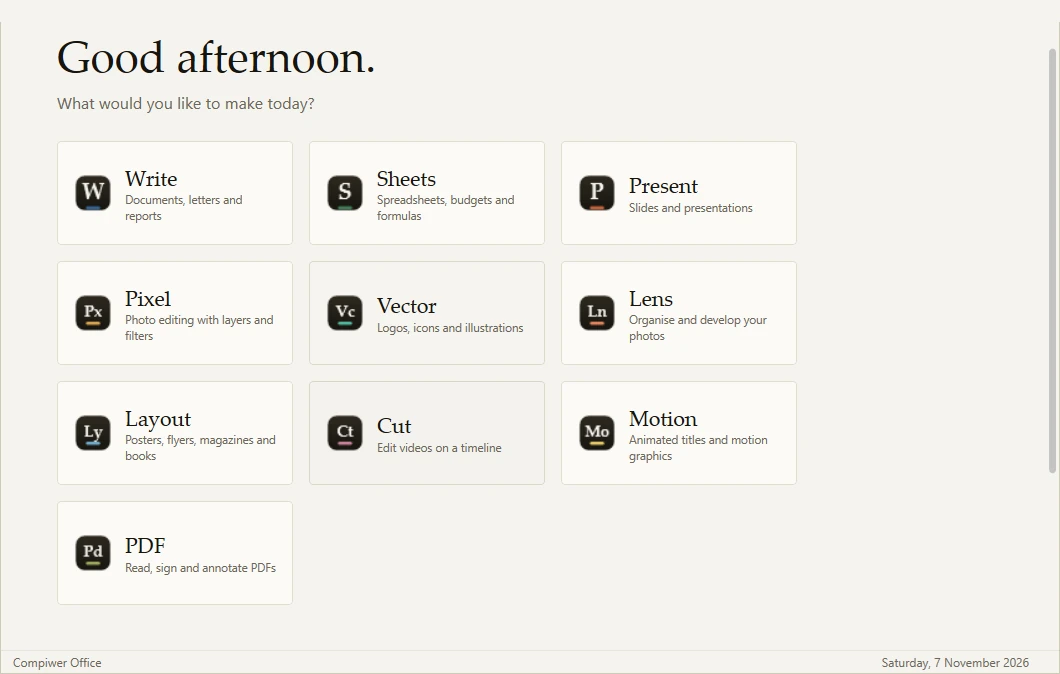
Ten apps for writing, numbers, slides, photos, design, video, motion and PDFs. One small installer, no account, works offline.
For work and school
Write, calculate, present and sign. Opens the .docx, .xlsx and .pdf files you already have.

Write
Documents, letters and reports
A calm word processor with a floating format bar, real styles and a navigation pane for long documents. It opens and saves .docx, so your files keep working everywhere.
Learn more
Sheets
Budgets, grades and numbers
A fast spreadsheet with a real formula engine, live charts and several sheets per workbook. Opens and saves .xlsx and .csv, and copy-paste works with other spreadsheet apps.
Learn more
Present
Slides and talks
Build slides with themes, layouts, shapes and pictures, then present full screen with smooth transitions. Exports to .pptx, PNG and PDF.
Learn more
PDF
Read, sign and annotate PDFs
Read PDFs comfortably, mark them up, fill and sign them, and reorder, merge or split pages.
Learn more
For making things
Photos, illustrations, layouts, videos and animation, with the same calm Compiwer look.

Pixel
Photo editing with layers
A layered photo editor with brushes, selections, blend modes and live-preview filters. Retouch photos, make posters or paint from scratch.
Learn more
Vector
Logos, icons and illustrations
Draw crisp vector artwork with the pen tool, shapes, gradients and shape combining. Opens and saves SVG for the web.
Learn more
Lens
Organise and develop photos
A photo library and developer. Rate and tag thousands of photos, then fine-tune them with edits that never touch your originals.
Learn more
Layout
Posters, magazines and books
Lay out pages with frames, master pages and text that flows from column to column. Export print-ready PDF and images.
Learn more
Cut
Edit videos on a timeline
Cut videos on a multi-track timeline with transitions, titles and colour, then export MP4 for YouTube, Shorts or Reels.
Learn more
Motion
Animated titles and motion graphics
Animate text, shapes and pictures with keyframes and easing curves. Make logo reveals, lower thirds and explainers, then export video or GIF.
Learn more
Install in a minute
- 1
Download the installer and open it.
- 2
If Windows says it protected your PC, choose More info, then Run anyway. The installer is new, so Windows hasn’t seen it often yet.
- 3
Click Install. It takes a few seconds and doesn’t need administrator rights.
- 4
Open Compiwer Office from the desktop or the Start menu and pick an app.
Good to know
Made for Windows
Windows 10 or 11, 64-bit. Everything runs on your computer and works offline.
Your files stay yours
No account and no telemetry. Documents are saved where you choose, in open formats where possible.
Check the download
Compare the installer with its published SHA-256 before you run it.
Easy to remove
Uninstall from Settings › Apps like any other program. Your documents are never deleted.
Ten apps. One download.
Free for students, teachers, creators and small teams.