

Mtrini Bots
Bots that keep working on your own computer, and ask before they act. Free, and open source when it ships. Coming soon for Windows.
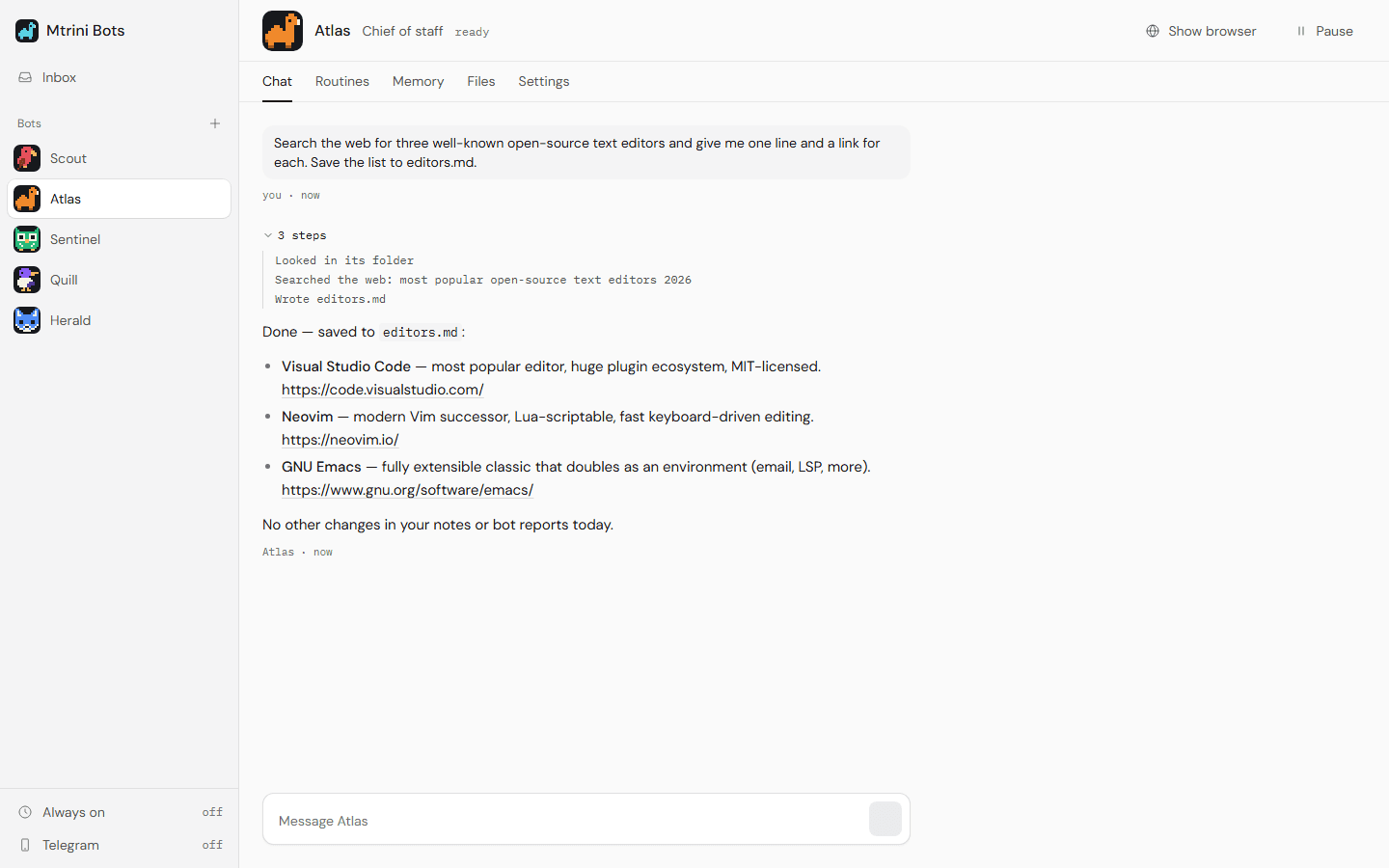
What a bot is
A bot has a name, a job, a folder and a memory of its own. You tell it what to follow. It does the work on a schedule and reports back.
Routines
Give a bot work to do every morning, every few hours, or on the days you pick. It runs without you watching.
An inbox, not a chat log
Each run ends in a short report you can read in a minute. When nothing changed, it says so in one line and stays quiet.
It asks first
Running a command, or anything that sends, posts, buys, deletes or confirms, stops and waits for your yes.
Its own browser
A bot reads and clicks through sites in a browser profile of its own. It never types a password: you sign in yourself, once.
Memory you can read
What a bot remembers is a plain text file. Open it, fix it, or delete lines. Its notes and results are files in its own folder.
Web search with no key
Bots can search the web out of the box. Add your own search service later if you prefer.
Telegram
Text your bots from your phone, get their reports there, and approve or deny with one tap. Optional.
Always on
Bots can keep running when you close the window and start again when you sign in to your computer.
Ten bots, ready to start
Start from one of these or make your own. Each has a pixel mascot, in the family of the Mtrini camel. Their routines start switched off, so nothing runs until you say so.
Atlas · Chief of staff
A morning briefing: what needs you, what got done, what is next.
Scout · Researcher
Researches a topic and gives sources, with what it could not verify kept apart.
Sentinel · Web watcher
Checks the pages you list and tells you only when something changed.
Quill · Writer
Drafts posts, emails and documents as files. It never sends them.
Herald · News digest
Reads the sites you follow and sends eight items at most, once a day.
Bazaar · Price watcher
Tracks prices on your wishlist and speaks up when one drops. It never buys.
Sage · Study coach
Quizzes you on your own notes and comes back to what you got wrong.
Compass · Job scout
Finds openings that fit your profile. Drafts applications only when you ask.
Echo · Social drafts
Turns your ideas into post drafts for the week. You do the posting.
Patch · Repo watcher
Watches code repositories for issues, pull requests and releases that need you.
Any model, starting with free ones
- A free model is built in. No key, no account, no card.
- If OpenCode is on your computer, its free models show up by themselves.
- Local models, your own API keys, and the models you set up in Mtrini Workspace work too: the two apps share them.
What it does not do
- It runs on your computer, not on a server. Bots work while the computer is on and awake, and stop when it is off.
- It is in development. Windows comes first; there is no download yet.
- The free built-in model has a daily allowance and answers one request at a time, so bots take turns.
- A bot is only as careful as its model. That is why sending, buying and deleting always wait for your yes.
Built in the open
Mtrini Bots runs on the Mtrini Workspace engine. Its code will be published in the same repository, under the same Apache-2.0 licence.